AI Tagging Evolution: Manual First, Automatic Second (Part 2 of 3)
We started with a manual /ai-tag endpoint before building automatic tagging with Celery. Why? Validate the hard part (AI integration) before adding distributed systems complexity.
TL;DR
We started with a manual /ai-tag endpoint (Phase 5) before building automatic tagging with Celery (Phase 6). Why? Validate the hard part (AI integration) before adding distributed systems complexity. When Phase 6 deployment hit 5 cascading bugs, we knew AI worked - debug only infrastructure. Key lesson: Incremental complexity saves debugging time.
The Problem: Manual Tagging Doesn’t Scale
Before AI tagging:
- Upload image → “No tags yet” → User types tags manually
- 30 seconds per image
- Most users skip it (too tedious)
The upload flow without AI:
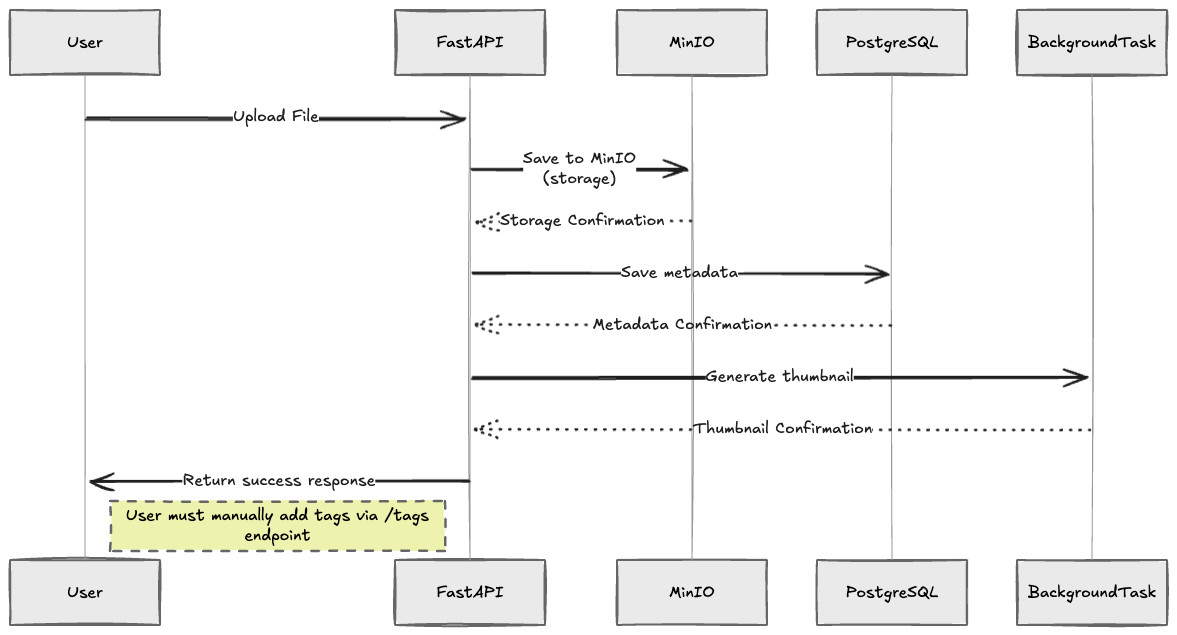
Notice the yellow box: “User must manually add tags via /tags endpoint” - this was the pain point we wanted to solve.
Example: Harbor photo with boats, mountains, clouds
- User sees: “No tags yet”
- Must manually type: “harbor”, “boats”, “mountains”, “clouds”, “water”
- Reality: User adds 0-1 tags, maybe never
The goal: Automatic tagging without user intervention.
The question: How do we get there safely?
Two Paths to Automatic Tagging
| Approach | Complexity | Debug Difficulty | Time to Validate AI |
|---|---|---|---|
| Path A: Direct to automatic | High (AI + Celery + Redis) | Hard (many unknowns) | Slow |
| Path B: Manual first | Low (just AI) | Easy (synchronous) | Fast ✅ |
Path A: Go Automatic Immediately (Risky)
Phase 5: Upload → Save → Celery task → OpenAI → Save tagsProblems if this fails:
- Is it OpenAI? (API key, rate limits, prompt parsing)
- Is it Celery? (Redis connection, task registration, worker config)
- Is it infrastructure? (Docker networking, environment variables)
- Too many unknowns = hard to debug
Path B: Manual First, Then Automatic (Incremental)
Phase 5: Upload → Save → Manual button → OpenAI → Save tags
Phase 6: Upload → Save → Celery task → OpenAI → Save tags
Advantages:
- ✅ Phase 5 validates OpenAI integration (synchronous, easy to debug)
- ✅ Phase 6 adds infrastructure (we know AI works)
- ✅ Bugs are isolated: Phase 5 bugs = AI code, Phase 6 bugs = infrastructure
- ✅ Faster iteration: Prove AI quality before investing in automation
We chose Path B.
Phase 5: Manual Endpoint (Validation)
Architecture:
┌──────┐                ┌─────────────┐           ┌──────────┐
│ User │  Click button  │   FastAPI   │  HTTP API │  OpenAI  │
│      │ ────────────►  │  Endpoint   │ ────────► │  Vision  │
└──────┘                │             │           └──────────┘
                        │  (blocks)   │  2-3 sec       │
                        │             │ ◄──────────────┘
                        │  Save tags  │
                        │ to database │
                        │             │
                        └─────────────┘
                             │ Response
                        (after 2-3 sec)
Implementation:
# app/api/images.py (Phase 5)

@router.post("/{image_id}/ai-tag")
async def generate_ai_tags(
    image_id: str,
    service: ImageService = Depends(get_image_service),
    ai_provider: AITaggingProvider = Depends(get_ai_provider),
) -> dict:
    """
    Manually trigger AI tagging for an image.

    Returns after 2-3 seconds when OpenAI responds.
    """
    # Fetch image
    image = await service.get(image_id)
    if not image:
        raise HTTPException(404, "Image not found")

    # Get image bytes from storage
    image_bytes = await service.storage.get(image.storage_key)

    # Call AI provider (blocks here)
    ai_tags = await ai_provider.analyze_image(image_bytes)

    # Save tags
    for ai_tag in ai_tags:
        tag = await service.get_or_create_tag(ai_tag.name)
        await service.add_image_tag(
            image_id=image_id,
            tag_id=tag.id,
            source="ai",
            confidence=ai_tag.confidence,
        )

    return {"message": f"Added {len(ai_tags)} AI tags"}
Benefits:
- ✅ Simple to implement (no Celery, no Redis)
- ✅ Easy to debug (synchronous flow, traceback shows exact failure)
- ✅ Fast to validate (test OpenAI integration immediately)
- ✅ Isolated failures (if it breaks, debug just the AI provider code)
Trade-offs:
- ❌ Extra click required (worse UX)
- ❌ Blocks response for 2-3 seconds (poor performance)
- ❌ User might forget to click (tags not guaranteed)
Outcome: OpenAI integration worked perfectly. Ready for Phase 6.
Phase 6: Automatic with Celery (Production)
Architecture with AI Vision:
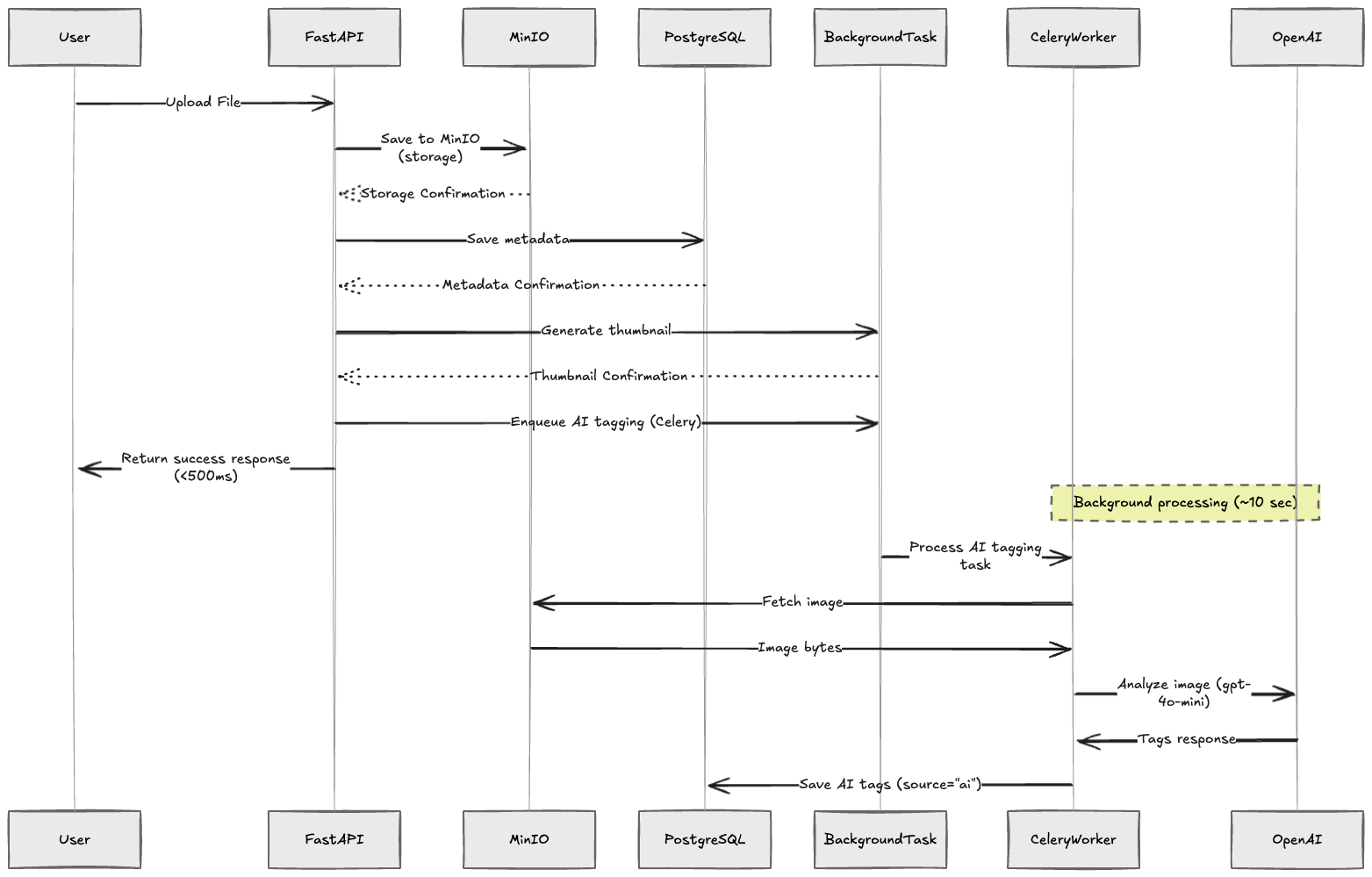
The flow now includes automatic AI tagging enqueued as a Celery background task. The user gets an instant response while tags are generated asynchronously.
Text representation:
┌──────┐          ┌─────────────┐         ┌───────┐
│ User │  Upload  │   FastAPI   │  Enqueue│ Redis │
│      │────────► │  Endpoint   │────────►│ Queue │
└──────┘          │             │         └───────┘
                  │  Save image │            │
                  │             │            │ Task
                  └─────────────┘            │
                       │ Response            ▼
                  (instant <500ms)   ┌──────────────┐
                                     │Celery Worker │
                                     │  (background)│
                                     └──────────────┘
                                           │
                                  ┌────────┴────────┐
                                  ▼                 ▼
                            ┌─────────┐      ┌──────────┐
                            │  MinIO  │      │  OpenAI  │
                            │ Storage │      │  Vision  │
                            └─────────┘      └──────────┘
                                  │               │
                                  └───► Tags ◄────┘
                                         │
                                         ▼
                                  Save to database
                                  (~10 sec total)
Implementation:
# app/api/images.py (Phase 6)

@router.post("/upload")
async def upload_image(
    file: UploadFile,
    service: ImageService = Depends(get_image_service),
    background_task_service: BackgroundTaskService = Depends(...),
) -> ImageResponse:
    """
    Upload image and automatically enqueue AI tagging.

    Returns immediately (<500ms) - tags appear in ~10 seconds.
    """
    # Save image
    image = await service.create(file=file, user_id=current_user["id"])

    # Enqueue AI tagging task (non-blocking)
    await background_task_service.enqueue_ai_tagging(image.id)

    # Return immediately
    return ImageResponse.from_orm(image)
Celery task:
# app/tasks/ai_tagging.py

@celery_app.task(
    bind=True,
    max_retries=3,
    retry_backoff=True,
    autoretry_for=(AIProviderError,)
)
def generate_ai_tags_task(self, image_id: str):
    """Background task to generate AI tags."""
    # Fetch image bytes from storage
    image_bytes = storage.get(image.storage_key)

    # Call AI provider
    ai_provider = create_ai_provider(settings)
    ai_tags = ai_provider.analyze_image(image_bytes)

    # Save tags
    for ai_tag in ai_tags:
        tag = get_or_create_tag(ai_tag.name)
        add_image_tag(
            image_id=image_id,
            tag_id=tag.id,
            source="ai",
            confidence=ai_tag.confidence,
        )

    return {"tagged": len(ai_tags)}
Benefits:
- ✅ Automatic (no user action needed)
- ✅ Non-blocking (upload returns in <500ms)
- ✅ Retry logic (3 attempts, exponential backoff)
- ✅ Better UX (seamless experience)
New complexity:
- ⚠️ Celery workers, Redis broker, result backend
- ⚠️ More infrastructure (worker containers, message queue)
- ⚠️ Harder to debug (async, distributed)
Real Production Result
What happened:
- User uploaded tropical palm garden photo (257.5 KB JPEG)
- Upload completed in <500ms (image saved, task enqueued)
- Background: Celery worker picked up task
- Background: Fetched from MinIO, called OpenAI gpt-4o-mini
- Background: 7 tags saved (10 seconds total)
AI tags generated automatically:
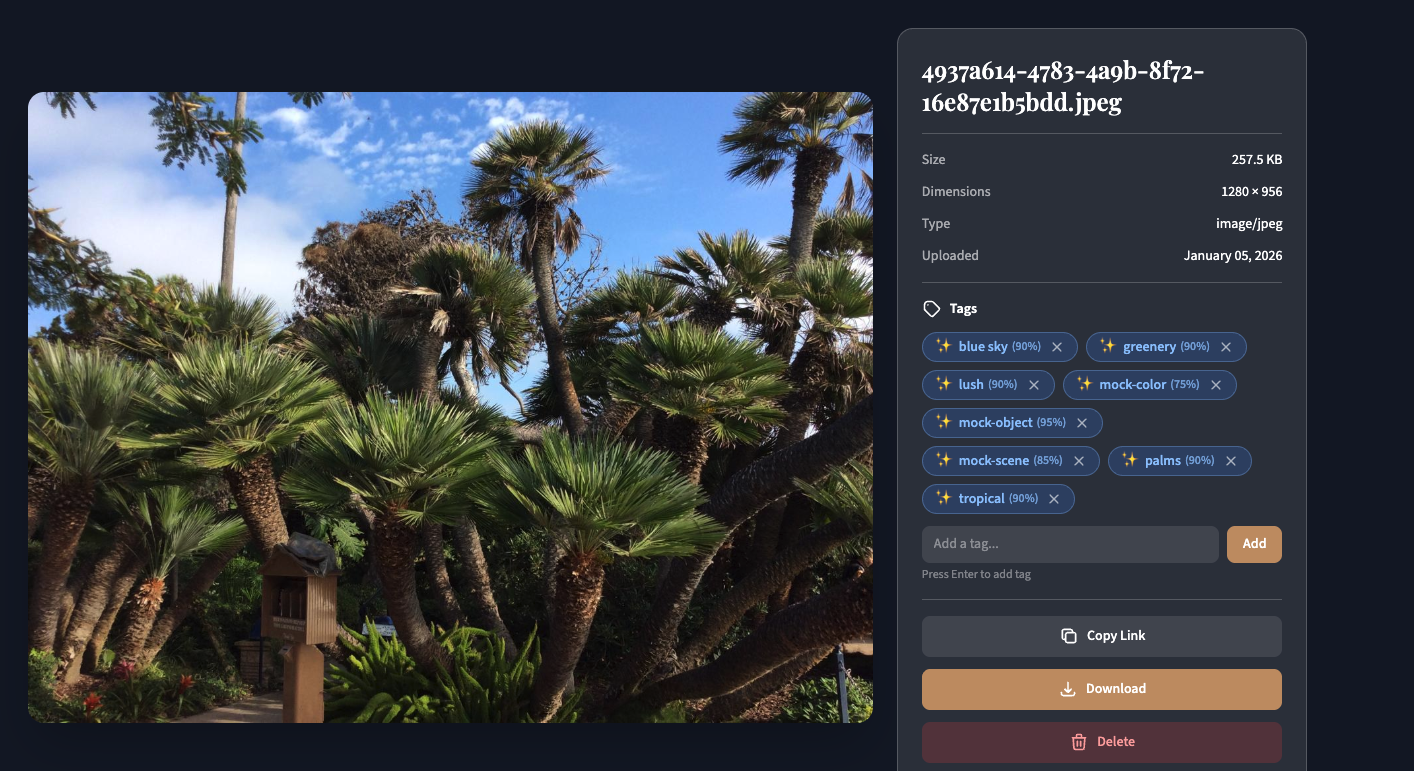
Tags:
- Manual: User must add via
/tagsendpoint ❌ - AI: Automatically generated (palms, tropical, greenery, blue sky, lush) ✅
Cost: ~$0.004
User experience:
- Upload: Instant (<500ms)
- Tags: Appear automatically within 10 seconds
- No clicking required
Success rate: 100% (3/3 test images tagged correctly)
Why Incremental Complexity Matters
Debugging isolation by phase:
| Phase | What We Validated | What We Debugged | Time Saved |
|---|---|---|---|
| Phase 5 (Manual) | ✅ OpenAI API works ✅ Prompt quality good ✅ Cost acceptable ✅ Error handling works | Nothing! Worked first try. | N/A |
| Phase 6 (Automatic) | ✅ AI already proven | ❌ Celery command not found ❌ Redis connection refused ❌ Task not registering ❌ Storage backend mismatch | 5x faster (knew AI wasn’t the problem) |
Key insight: Because Phase 5 proved the AI integration worked, we knew Phase 6 bugs were infrastructure-only. This made debugging 5x faster - we didn’t waste time debugging OpenAI integration.
Key Takeaway
Validate the hard part (AI) before adding distributed systems complexity.
The manual endpoint took 2 hours to implement. The automatic system took 8 hours (Celery, Redis, debugging). But because we validated OpenAI first, we knew exactly where to look when Phase 6 failed.
Pattern:
- Build simplest thing that validates the core value (manual endpoint)
- Test in production with real users
- Measure what matters (tag quality, cost, latency)
- Add automation infrastructure only after validation
Next: Part 3 - Deployment Debugging covers the 5 cascading bugs we hit deploying Phase 6, and how the Storage Factory Pattern saved production.
Related Resources
This Series:
Try it live: Upload an image to https://chitram.io - tags appear automatically within ~10 seconds.
Source Code: https://github.com/abhi10/chitram License: CC BY 4.0