Integrating Supabase Auth with FastAPI: A Production Story
What went wrong (and right) when we added Supabase authentication to our image hosting service. Docker env vars, SDK breaking changes, and a sync-on-auth pattern that made migration painless.
This is part of the Chitram series — documenting lessons from building a production image hosting service.
TL;DR: Use a pluggable auth provider pattern with sync-on-auth to migrate to Supabase without touching your existing user data. And always check if your SDK version matches the documentation you’re reading.
We recently added Supabase authentication to Chitram, our image hosting service. The goal was simple: offload password management to Supabase while keeping our existing users and their images intact.
It took 4 PRs and several production debugging sessions. Here’s what we learned.
The Architecture Decision
We had two options:
- Full migration: Move all users to Supabase, update foreign keys, pray nothing breaks
- Pluggable providers: Keep local auth working, add Supabase as an option, sync on authentication
We chose option 2. The AuthProvider interface looks like this:
class AuthProvider(ABC):
    @abstractmethod
    async def register(self, email: str, password: str) -> UserInfo | AuthError:
        pass

    @abstractmethod
    async def login(self, email: str, password: str) -> tuple[UserInfo, TokenPair] | AuthError:
        pass

    @abstractmethod
    async def verify_token(self, token: str) -> UserInfo | AuthError:
        pass
Both LocalAuthProvider and SupabaseAuthProvider implement this. A factory function picks which one based on an env var:
def create_auth_provider(db: AsyncSession, settings: Settings) -> AuthProvider:
    if settings.auth_provider == "supabase":
        return SupabaseAuthProvider(db=db, settings=settings)
    return LocalAuthProvider(db=db, settings=settings)
Switch providers by changing AUTH_PROVIDER=supabase in your environment. No code changes needed.
The Sync-on-Auth Pattern
The key insight: Supabase handles authentication, but we still need a local user record for foreign key relationships (images belong to users). Here’s how sync-on-auth works:
async def _find_or_create_local_user(self, supabase_id: str, email: str) -> User:
    # 1. Already linked? Return existing user
    user = await self._db.execute(
        select(User).where(User.supabase_id == supabase_id)
    )
    if user := user.scalar_one_or_none():
        return user

    # 2. Email exists locally? Link to Supabase (migration path)
    user = await self._db.execute(
        select(User).where(User.email == email)
    )
    if user := user.scalar_one_or_none():
        user.supabase_id = supabase_id
        await self._db.commit()
        return user

    # 3. New user? Create local record
    user = User(email=email, supabase_id=supabase_id, password_hash=None)
    self._db.add(user)
    await self._db.commit()
    return user
This runs on every successful Supabase authentication. Existing users get linked by email. New users get created. The local user.id remains the FK for images — no data migration needed.
Failure 1: Docker Environment Variables
Symptom: App deployed, but still using local auth instead of Supabase.
Investigation:
docker compose exec app env | grep -i supabase
# Nothing returned
The env vars were in .env.production but not reaching the container.
Root cause: Docker Compose doesn’t automatically pass through environment variables. You need explicit mapping:
# docker-compose.yml
services:
  app:
    environment:
      AUTH_PROVIDER: ${AUTH_PROVIDER:-local}
      SUPABASE_URL: ${SUPABASE_URL:-}
      SUPABASE_ANON_KEY: ${SUPABASE_ANON_KEY:-}
The ${VAR:-default} syntax reads from the host environment with a fallback. Without this, your container has no idea those vars exist.
Time lost: 45 minutes
Failure 2: SDK Breaking Changes
Symptom: Container crashes on startup with:
AttributeError: 'ClientOptions' object has no attribute 'storage'The code that broke:
from supabase.lib.client_options import ClientOptions

options = ClientOptions(
    auto_refresh_token=True,
    persist_session=False,
)
self._client = create_client(url, key, options=options)
Root cause: We were using supabase>=2.27.1. The SDK had changed the ClientOptions API between versions. The storage attribute we weren’t even using was being set internally and failing.
The fix: Remove ClientOptions entirely. Defaults work fine for server-side usage:
self._client = create_client(url, key)Lesson: When a third-party SDK errors on internal attributes, check if you’re using deprecated APIs. The simplest initialization often works best.
Time lost: 30 minutes
Failure 3: Tests Connecting to Production Supabase
Symptom: Tests failing with Supabase connection errors when they should be using local auth.
Root cause: Our .env file had AUTH_PROVIDER=supabase for local development. Tests were loading this before we could override it.
The fix: Set the env var at the very top of conftest.py, before any app imports:
import os
os.environ["AUTH_PROVIDER"] = "local"  # Must be before app imports

# Now import app modules
from app.main import app
Python loads config at import time. If your settings class reads AUTH_PROVIDER when the module loads, you need to set the env var before that import happens.
Time lost: 20 minutes
Failure 4: “Invalid Credentials” for Existing Users
Symptom: Users who had accounts before the Supabase migration couldn’t log in.
This wasn’t a bug — it was expected behavior we hadn’t communicated.
Existing users had passwords stored in our local database. Supabase knew nothing about them. On first login attempt, Supabase returned “invalid credentials” because the user didn’t exist there.
The migration path:
- User goes to
/register(not/login) - Registers with their existing email
- Supabase creates their account
- Our sync-on-auth finds the existing local user by email
- Links the local user to the new Supabase ID
- User is now authenticated, all their images still attached
This is the power of sync-on-auth: existing data stays intact, users just need to “re-register” once.
Failure 5: Git Chaos on the Production Server
Symptom:
git pull origin main
# error: unable to unlink old file: Permission denied
# fatal: detected dubious ownership in repository
Root cause: We’d made manual edits directly on the production server (editing files to debug the SDK issue). Docker had created some files as root. Git didn’t trust the directory.
The fix:
sudo git config --global --add safe.directory /opt/chitram
sudo git checkout -- .
sudo git clean -fd
sudo chown -R chitram:chitram .
git pull origin mainLesson: Never edit files directly on production. Even “quick fixes” create state drift that breaks deployments. Use CI/CD or at minimum a proper deploy script.
Time lost: 15 minutes
The Final Result
After 4 PRs:
- PR #31: Pluggable auth system with sync-on-auth
- PR #32: E2E tests for the auth flow
- PR #33: Docker Compose env var passthrough
- PR #34: SDK compatibility fix
Production verification:
docker compose exec postgres psql -U chitram -d chitram \
  -c "SELECT id, email, supabase_id FROM users WHERE email = 'user@example.com';"

                  id                  |      email          |             supabase_id
--------------------------------------+---------------------+--------------------------------------
 xxxxxxxx-xxxx-xxxx-xxxx-xxxxxxxxxxxx | user@example.com    | yyyyyyyy-yyyy-yyyy-yyyy-yyyyyyyyyyyy
The supabase_id is populated. Auth is working. Images still belong to the right users.
A Note on Testing
We kept tests completely isolated from Supabase. The test suite uses LocalAuthProvider exclusively:
# conftest.py
import os
os.environ["AUTH_PROVIDER"] = "local"  # Before any imports

@pytest.fixture
async def test_user(db_session):
    """Create test user with local auth — no Supabase calls."""
    user = User(email="test@example.com", password_hash=hash_password("testpass"))
    db_session.add(user)
    await db_session.commit()
    return user
This means:
- 222 tests run in ~25 seconds (no network calls)
- CI doesn’t need Supabase credentials
- Tests are deterministic (no external service flakiness)
The pluggable provider pattern makes this possible. Production uses Supabase, tests use local auth, same code path.
For E2E browser tests against production, we have a separate suite that runs post-deploy. Those do hit real Supabase and verify the full flow works.
Key Takeaways
-
Pluggable architecture pays off. Switching auth providers is now a config change, not a code rewrite.
-
Docker env vars need explicit mapping. Don’t assume they pass through automatically.
-
Set test env vars before imports. Python loads config at import time.
-
Check SDK versions. If internal attributes error, you’re probably using deprecated APIs.
-
Sync-on-auth enables gradual migration. No big-bang user migration needed.
-
Never edit production directly. Even debugging. Push through git or accept the chaos.
The Pattern Summary
If you’re adding Supabase to an existing FastAPI app:
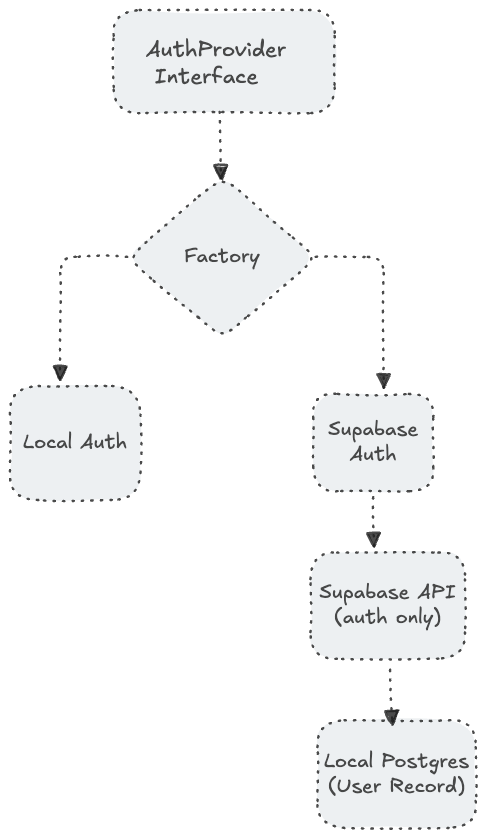
The abstraction adds ~200 lines. The flexibility it provides is worth it.
Chitram is an open-source image hosting service built with FastAPI, PostgreSQL, MinIO, and now Supabase. Check it out at chitram.io.